
How it works
How does the cloud layer work?
The clouds are a pattern on a thin shell at the cloud base, cut from noise read at five scales and lit by the sun and sky, for a few texture reads per pixel.
Project: OPFRAME · Oct 2026
The clouds are a pattern on a thin shell around the Earth, at the height of the cloud base. There’s nothing in the scene that’s an actual cloud with a top, a bottom and sides. For each pixel, the renderer works out where the line of sight meets the shell, how much cloud the pattern puts there, and how the sun and the sky would light it. That costs a few texture reads per pixel, it holds up from altitude and from orbit, and from the ground it looks like a ceiling of cloud.
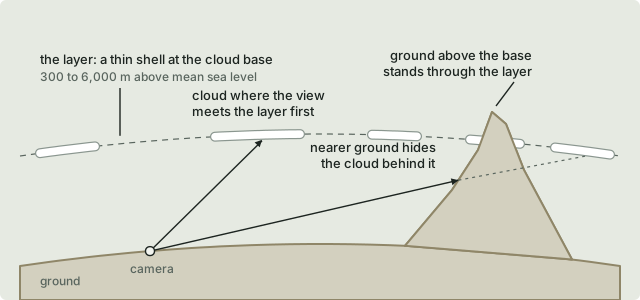
In the diagram:
- The shell sits at the cloud base set in the Lighting flyout. That can be anywhere from 300 to 6,000 m above mean sea level, and it’s 2,000 m unless you change it.
- If a view reaches the shell before anything else, it sees whatever’s there, either cloud or clear sky between clouds.
- If a view hits the ground first, it never sees the cloud behind it. Ground that’s higher than the base pokes up through the layer.
You only get clouds in the 3D view with Sun lighting. The 2D map and Map lighting are there for reading the ground, and cloud would just get in the way.
Where the shape comes from
The shape is noise, a block of 128 × 128 × 128 values. It’s generated on the CPU when the application starts and uploaded to the GPU once, as a 3D texture. It’s the same kind of noise games use for clouds, Perlin noise carved up by Worley noise, which gives soft billows with rounded edges. It’s made from a fixed seed, so it’s identical on every run, and it wraps, with each face of the block carrying straight on into the opposite one. Generating it takes about a tenth of a second in a Release build, on a worker thread, so the clouds appear a moment after start-up.
It helps to picture the block repeated over and over to fill space, like a block of marble. The cloud layer is a thin shell cut through that marble, and the pattern on the shell is whatever the marble has in it at that point. The noise is read at each point’s real position on the Earth, so there are no seams anywhere on the globe and nothing strange happens at the poles. A given place always has the same cloud over it.
Read at a single scale, the noise looks too regular, so it’s read at five and the results are added together, each with its own share:
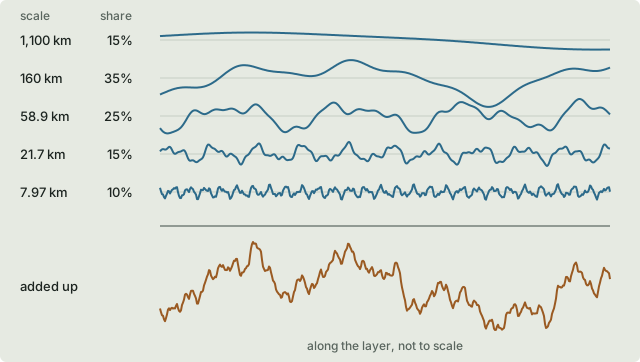
| Ground the block spans | Share | What it gives |
|---|---|---|
| 1,100 km | 15% | Broad weather: where cloud gathers across a region |
| 160 km | 35% | The large groups of cloud and the clear gaps between |
| 58.9 km | 25% | Individual clouds |
| 21.7 km | 15% | Their lumps |
| 7.97 km | 10% | Their edges; one texel is about 60 m here |
Below the broadest, each scale is about 2.7 times the next one down, and none of them goes into another a whole number of times. The five readings never line up the same way again within any distance you could actually see, which is why there’s no visible repeat, even from orbit.
One technical point: as everywhere else in the renderer, nothing absolute is sent to the GPU as a 32-bit float. The CPU works out, in double precision, where each scale’s reading is at the camera, wrapped into the block, and the shader only adds how far the point is from the camera. That keeps the finest scale as steady over Wales as it is anywhere else.
New clouds
The New clouds button doesn’t generate new noise. It picks a new cloud seed, which shifts where in the block each of the five scales is read from, by a different amount for each. Every cloud moves at once, large and small, and nothing has to be rebuilt. The seed is saved in the settings, so the same clouds come back after a restart. That’s handy when you’ve moved a cloud off the bit of ground you’re looking at.
How much of the sky is cloud
Cloud cover is chosen the way a METAR reports it, in oktas, or eighths of the sky:
| Cover | Oktas reported | Used | Share of the sky |
|---|---|---|---|
| Few | 1 to 2 | 1.5 | 19% |
| Scattered | 3 to 4 | 3.5 | 44% |
| Broken | 5 to 7 | 6 | 75% |
| Overcast | 8 | 8 | 100% |
Adding up the noise gives a value at every point on the shell. Above a threshold there’s cloud, and below it there’s clear sky. Each cover has its own threshold, set so that the right share of the shell ends up above it. To find them, the sum is sampled at 65,536 random points when the noise is made, and the values are sorted. Scattered’s threshold, for example, is the value with 44% of the samples above it. Changing the cover just changes one number the shaders read, and it shows from the next frame.
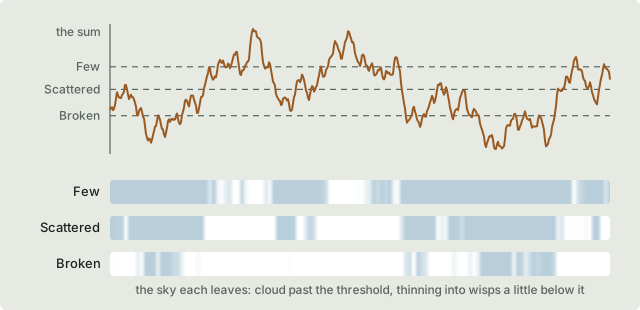
A cloud doesn’t stop at a hard line, though. Its density, from 0 for clear air up to 1, rises across a band around the threshold. It starts from nothing a little below the threshold, is at a quarter right on it, and reaches full a little above. How thick the cloud is to light goes with the square of the density, so the edges thin out gradually into wisps. At the threshold, looking straight up, the cloud hides about 63% of what’s behind it. That’s roughly where it stops looking like haze and starts looking like cloud, so it’s where each cover’s share is counted.
Looking through the layer at an angle means crossing more of it, so cloud towards the horizon looks thicker than cloud overhead. The slant is capped at four times, otherwise a layer seen nearly edge-on would go solid.
Drawing it
The cloud has a pass of its own, a single triangle covering the screen. It runs after the ground and the sky but before anything laid over the map, so symbols, labels, rings and volumes always stay readable on top of the cloud. For each pixel, it:
- Finds where the view meets the shell. From below the base, every view going upwards meets it; from above, only views going downwards do. Near the ground the shell is treated as a sphere centred under the camera, and from space it follows the ellipsoid. The atmosphere’s rays are worked out the same way.
- Checks the ground. The ground has already been drawn, so its depth is in the depth buffer. If the ground is nearer than the shell, the cloud is behind it and the pixel is left alone.
- Reads how much cloud there is. The five readings are added up, and the threshold turns the total into a density. Clear sky is left alone too, so a Few sky costs very little.
- Lights it, as described below.
- Hazes it by the air between the camera and the cloud, taken from the atmosphere’s tables at the cloud’s own distance, the same way the ground is hazed. A layer stretching out to the horizon fades into the colour of the sky, just as distant hills do. At 2,000 m that horizon is about 160 km away.
- Blends it over what’s already there, more strongly the thicker the cloud. The cloud doesn’t write any depth of its own.
Distant cloud is read from smaller copies of the noise texture (its mipmaps), picked by how fast the point moves from one pixel to the next. Distant ground textures are read the same way. Without that, far-off cloud would sparkle as the camera moved.
The cloud base is set above mean sea level, but inside the renderer every height is measured from the WGS84 ellipsoid. Each frame, the base is converted using the geoid’s height under the camera. That only varies by a few metres across a country, so the layer doesn’t visibly move as the camera travels.
Lighting a flat layer
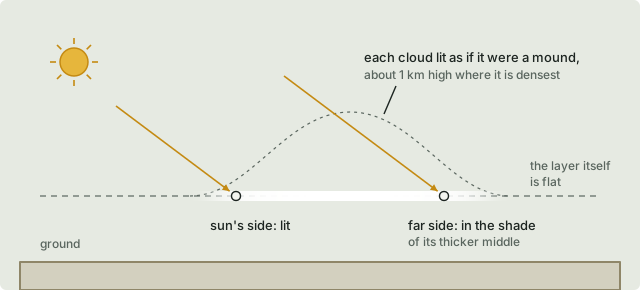
A flat layer has no sides and no top of its own to light, so it’s lit as if it were a slab of cloud.
Sunlight at the cloud’s height comes from the atmosphere’s tables, the same ones that colour the sky and light the ground. That’s why the clouds go white at midday and gold and pink at sunset without any colours being picked for them. Skylight lights the layer from the whole sky as well.
From above, with the sun up, the tops give back the share of sunlight the cloud scatters, and thicker cloud gives back more. From below, the underside gets whatever makes it through. Thin cloud lets plenty through, while thick cloud lets little through and looks grey. The ground beneath lights it faintly too, less so where the cloud is shading that ground.
On a flat slab both sides of a cloud would be lit the same, so to give each cloud some shape, it’s treated as a mound. The shader reads the cloud a second time a little way towards the sun, reaching further when the sun is lower, up to 4 km. It takes the cloud to be a mound about 1 km high at its densest, so if there’s thicker cloud between the point and the sun, the point is in its shade. The side of a cloud facing away from the sun comes out darker than the side facing it. Seen from below, it’s the other way round: the side nearer the sun is brighter, because its light has less cloud to cross.
Then there’s the silver lining. Looking towards the sun, thin cloud scatters sunlight on towards your eye, so the thin edges glow. Thick cloud doesn’t, because its light has been scattered too many times to keep its direction.
I tuned a handful of numbers by eye against photographs: how thick cloud is at full density, how soft its edges are, the height of the mound, and how strongly it scatters forwards. Everything else comes from the atmosphere.
Shadows on the ground
The shadows are worked out in the ground’s own shader. For each ground pixel, it follows the sun’s direction up to the shell, reads the cloud there with the same function the cloud pass uses, and dims the direct sunlight by however much that cloud lets through. Skylight is left as it is, so a cloud’s shadow is lit like a slope facing away from the sun and never goes black.
Because the shadow is found along the sun’s direction, it lands where it should rather than straight under its cloud, and a low sun throws it a long way:
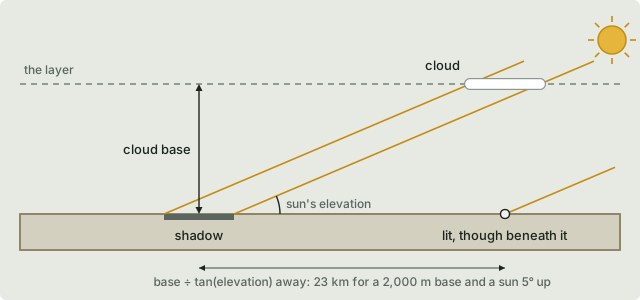
With a 2,000 m base and the sun 5° up, a shadow lands 2,000 ÷ tan 5° ≈ 23 km from its cloud. Raise the base and the shadows slide further away; drag the time towards midday and they move back in under their clouds. Ground above the base has no cloud over it, so it’s never shaded by one.
The sun behind a cloud
The bloom, the glare that spreads around bright light, starts from the sun’s disc wherever the sky shows. That disc is dimmed by any cloud in front of it, read with the same function again. A thick cloud hides the glare completely, while a thin edge lets some of it through.
One function, three uses
The cloud pass, the shadows on the ground and the glare from the sun all read the cloud through the same shader functions, so what’s drawn, what casts a shadow and what hides the sun always agree. With the cover set to None, the cloud pass doesn’t run, the other two skip the cloud on a single flag, and the picture is exactly what it would be with no cloud feature at all.
What it isn’t
It isn’t volumetric. There’s no depth to fly through. From the layer’s own height you see it edge-on, as a line, and from the ground it’s a textured ceiling rather than towering cumulus. Volumetric clouds would keep the noise, the seed, the thresholds, the shadows and the controls, and replace the way each pixel is shaded.
It isn’t weather either. The cover is a picture of a sky, not a forecast, and the clouds don’t drift with the wind or with time. Dragging the time only moves the sun, and the shadows with it.
It doesn’t get in the way of anything. Cloud has no effect on line of sight, the viewshed, picking or what a sensor can see, and it doesn’t hide entities, which are drawn after it.
And it isn’t part of the exposure. If the exposure adapted to the light under a cloud, the picture would brighten and darken every time the camera crossed the edge of a shadow.